
Data source: situation
Monitoring & Operations
Improve responsiveness: reports from production immediately reach the right experts, are resolved traceably and analyzed measurably.
Start small. Scale fast.
Reported fast. Resolved fast. Scaled by your own teams.
Installation and first report types in less than a day: set up an expert group, define a report type, and disruptions reach the right experts right away. Response and resolution times are measured from the very first report. From there, your teams scale on their own: new report types are created by reusing existing ones.
Start
< 1 day
installation and first report types
Start
From report #1
response and resolution times measurable
Scale
Reuse
create new report types from existing ones
Scale
Self-organized
scaling driven by your own teams
The challenge
Calling out, phone calls, notes – and then?
Disruptions and needs in production are often reported verbally. Who is responsible, how long it takes and what follows remains in the dark.
Unclear responsibility
Reports reach the wrong person or everyone at once. The right experts find out too late.
Left lying around
Without follow-up, reports get lost – until a small disruption turns into downtime.
No data to learn from
How often something happens and how quickly people respond cannot be measured. Improvement remains a gut feeling.
How it works
Report. Resolve. Analyze.
Every report becomes a traceable process – from receipt to analysis.
01
Report
Where it happens
Workers report at the workstation, systems report automatically – always following the same pattern.
02
Resolve
By the right experts
The responsible expert group is notified immediately. If a report remains open, it is escalated.
03
Analyze
With reliable KPIs
Frequencies, resolution and response times show where improvement pays off.
Connected Support Organization
Integrate the support organization
Maintenance, warehouse, logistics or quality: every report reaches exactly the experts who can resolve it – and everyone involved can see the current status at any time.
Maintenance
Warehouse
Logistics
Quality
Custom expert groups
Expert groups
Experts from one department are notified together and at the same time.
Report types as templates
Defined centrally, with custom fields – every report contains what the experts need.
Central overview
New, assigned and all other reports at a glance.
Documented processing
Status, assignee, comments and attachments – traceable until completion.
Notification
In the application and by email, with a direct link to the report.
Multilingual
Report types, fields and notifications in several languages.
Escalation
Nothing gets left behind
For each report type, you define when to escalate. Once the time has expired, the next level takes effect automatically.
Warning level
After a defined time from receipt, the experts are notified again and, if necessary, additional recipients.
Alarm level
If the report remains open, it is escalated – to additional recipients, for example the shift supervisor.
Visibly prioritized
Escalated reports are clearly highlighted in the overview and handled first.
Reaction & Resolution KPIs
Make responsiveness measurable
How often does what happen – and how quickly do people respond? The analysis shows where disruptions occur frequently and where response and resolution take too long. The basis for continuous improvement.
Reports per report type
Which disruptions and needs occur how often?
Resolution time per report type
How long does it take until a report is resolved?
Reports per status
How many reports are new, in progress or completed?
Average response time
How quickly is each type of report responded to?
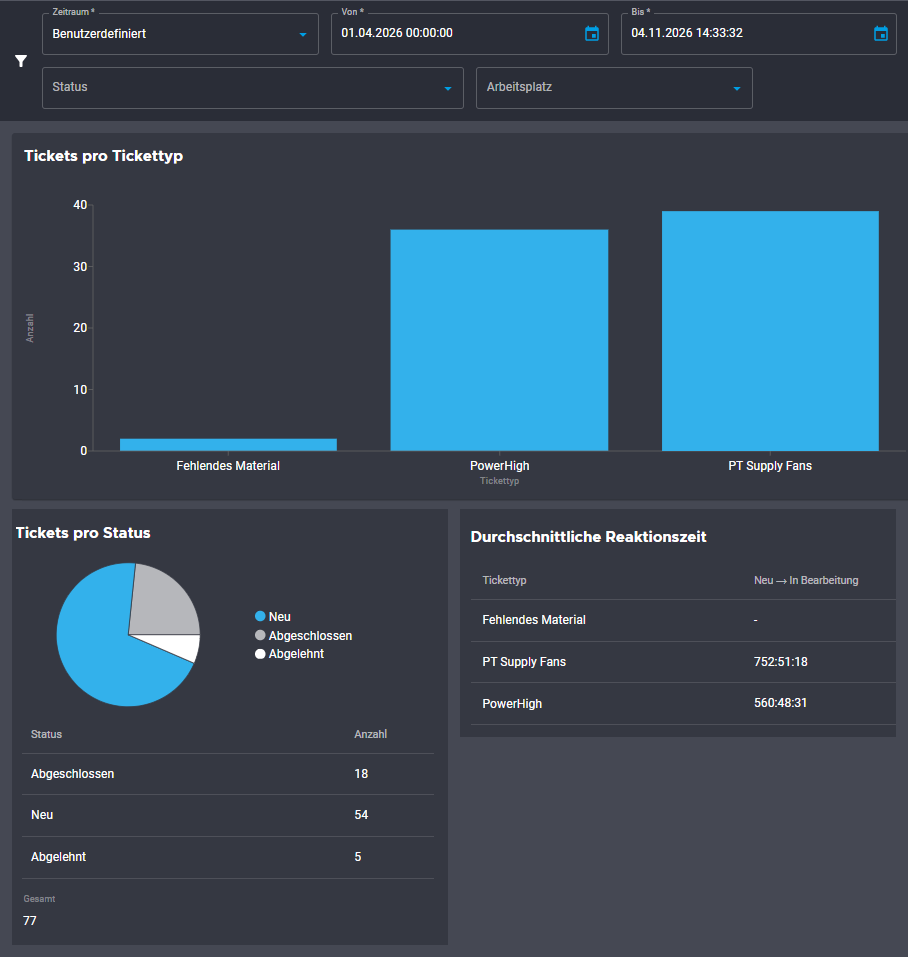
Filter by period, expert group, report type and workstation. Export as CSV for your own analyses and documentation.
Report sources
Where the reports come from
Monitoring & Operations bundles reports from all areas of production – from people and from systems.
Workers
Disruptions, material needs and requests directly from the workstation.
Material
Warnings about dwell times and inventory automatically trigger a report.
Systems
Third-party systems create reports via the API or a link with prefilled data.
FAQ
Frequently asked questions
What does Monitoring & Operations do?
Malfunctions, material requirements and requests from production are sent as reports directly to the responsible experts – for example in maintenance, warehouse or quality. There they are processed, escalated if necessary and evaluated. Calls and shouted requests become a traceable process with short response times.
How does a report reach the right person?
Each report type is assigned to one or more expert groups. When a report comes in, all members of these groups are notified at the same time – and only them. Every report reaches the right experts immediately without disturbing everyone else.
What happens if a report is not handled?
Escalation levels can be defined for each report type – a warning level and an alarm level, each with a time span from receipt of the report. When it expires, the level is triggered automatically, additional recipients are notified and the report is clearly highlighted in the overview.
How do experts process a report?
In a central overview, experts see new reports, reports assigned to them and all other reports. They set the status, assign processors, document progress with comments and attachments and close the report as soon as the problem is solved.
Through which channels are experts notified?
Directly in the application and by email. The email contains all relevant information and a link that opens the report immediately. Notifications are sent for new reports and when an escalation level is reached, and they can be adapted to the desired language.
Which key figures are available?
The evaluation shows reports per report type, processing time per report type, reports per status and the average response time. The data can be filtered and exported as CSV – as a basis for documentation and continuous improvement.
Can reports also be created automatically?
Yes. Third-party systems create reports via the API or a link with prefilled data. For example, warnings from Connected WIP – such as an exceeded dwell time or inventory below a limit – automatically create a report for the responsible expert group.
Can report types be adapted to our processes?
Yes. Report types are created centrally as templates – with custom fields and content, including extended data types such as links. Names and field contents can be maintained in several languages. Reports are always captured the same way across shifts and departments.
Which personal data is processed?
As little as possible. The application does not process any mandatory personal data; only the email addresses of the experts are required for notifications. Role-based user management controls access. When operated on premises, data sovereignty remains entirely within your company.
Respond faster – improve measurably
In a demo, we show you how reports from your production reach the right experts and how you can measurably improve response times.