
Data source: material
Connected WIP
Track material between production steps and monitor inventory in buffers and intermediate storage in real time – exactly where ERP and WMS have no visibility.
Start small. Scale fast.
One buffer today. The entire material flow tomorrow.
Installation and first structures in less than a day. From the first registered carrier, stock levels and dwell times are visible, with no additional hardware at the storage location. From there, your teams scale on their own: new storage locations are created by reusing existing ones.
Start
< 1 day
installation and first structures
Start
From carrier #1
stock levels and dwell times visible right away
Scale
Reuse
create new storage locations from existing ones
Scale
Self-organized
scaling driven by your own teams
The challenge
Material is waiting – and nobody sees it
Buffers and intermediate storage areas form between production steps. What is stored there, for how long and on which handling unit often remains invisible.
Invisible buffers
WIP inventory between production steps hardly shows up in ERP and WMS. Often only the worker on site knows where material is waiting.
Searching instead of producing
Handling units are searched for, bookings are entered and corrected by hand – with a lot of effort and errors.
Dwell times are noticed too late
Material sits too long, ties up capital and space and delays the following steps.
How it works
From the storage bin to the shared data foundation
Every handling unit is captured where it is put down – and from then on is visible throughout the plant.
01
Register
At the storage bin
Register handling units at a storage bin via handheld scanner, at the terminal or automatically via the API.
02
Monitor
In real time
Occupancy, inventory and dwell times per storage bin are continuously visible.
03
React
Automatically
When limits are exceeded, notifications go to the responsible experts – before material becomes a problem.
Buffer & Storage Management
Buffers and storage bins at a glance
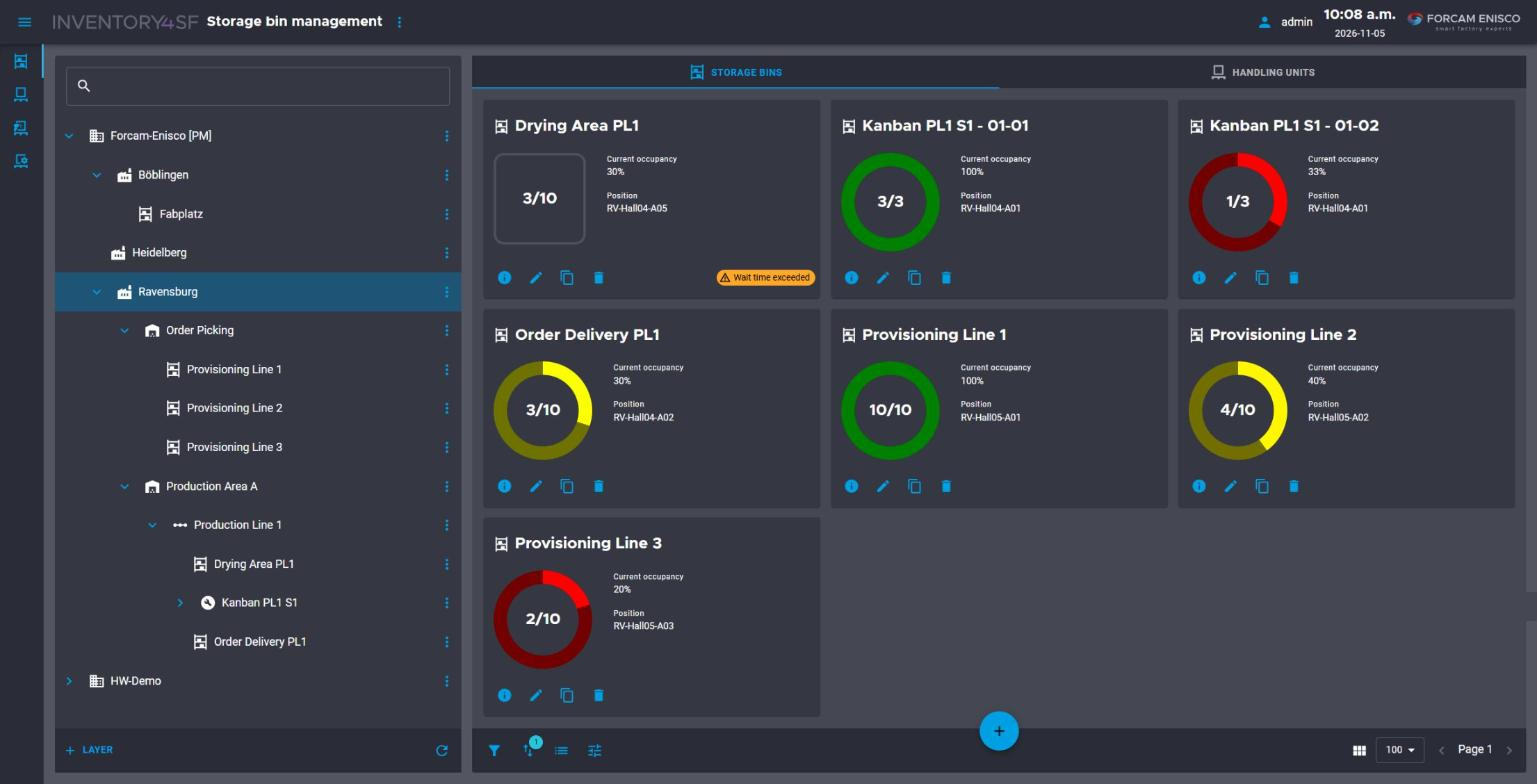
Connected WIP maps intermediate storage and buffers between production steps and shows the current occupancy of each storage bin – logically grouped by production step or process segment.
Intermediate storage
Buffers
Storage areas
WIP inventory
Clear structure
Areas, storage locations and storage bins in a clear hierarchy.
Occupancy at a glance
Per storage bin as a number and as a chart.
Grouped by process
Buffers grouped by production step or process segment.
Correctly occupied
Storage bins only accept permitted handling unit types – with a notice in case of incorrect occupancy.
Carrier Tracking
Track handling units
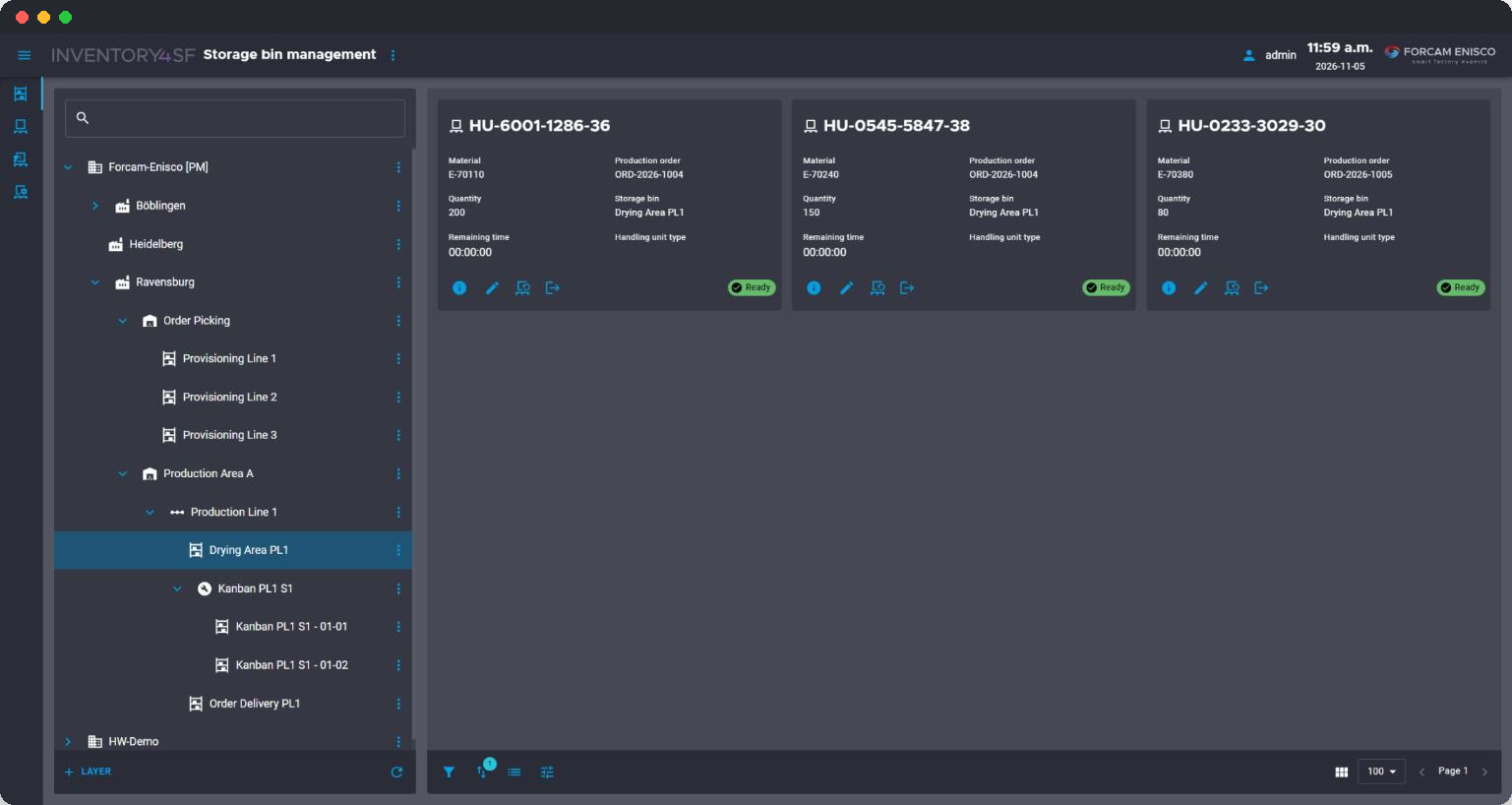
Every handling unit is uniquely identified – from registration at the storage bin to deregistration. So you can find material quickly, even while it is in transit.
Euro pallet
Small load carrier (SLC)
Mesh box pallet
Transport trolley
Register by scan
Via handheld scanner, manual entry, in the shop floor terminal or via the REST API.
Complete life cycle
Register, edit, reset and deregister handling units.
Mark status
Release status such as blocked or quality status such as scrap.
Search and filter
By material, order, storage bin or remaining dwell time.
Custom handling unit types
With properties such as dimensions and weight as well as an image.
Consistently described
Reusable properties appear as fields in all views.
Dwell Time Monitoring
Monitor dwell times
Connected WIP monitors how long material sits at each storage bin and raises an alert before dwell times become a problem.
Time-based monitoring
Dwell times are continuously monitored per storage bin.
Warning at the storage bin
A notice immediately shows where the dwell time has been exceeded.
Sorted by remaining time
Handling units with little remaining dwell time are listed first.
Automatic notifications
When a limit is exceeded, notification rules send a notification to the responsible expert group.
Seamlessly integrated
Where the material is moved
Connected WIP runs in the familiar working environment – without additional hardware at the storage bin.
Shop floor terminal in the MES
Register handling units directly from the production process.
Browser
On PC or tablet, with a user interface designed for the shop floor.
REST API
Third-party systems can execute all functions – from storage bin to handling unit.
FAQ
Frequently asked questions
How does Connected WIP differ from warehouse management in ERP or WMS?
Connected WIP works at shop floor level: it makes inventory in intermediate storage and buffers between production steps visible – exactly where ERP and WMS systems usually have no insight. Connected WIP complements these systems and can be connected to them via an open interface.
Which inventory does Connected WIP make visible?
Work-in-progress inventory in production: material in buffers and intermediate storage, logically grouped by production step or process segment. For each storage location, you see the current occupancy as a number and as a chart.
How are load carriers registered and deregistered?
Directly at the storage location: with a handheld scanner, by manual entry, in the shop floor terminal or automatically via the REST API. This ensures that no goods are missed and reduces the effort for postings and corrections.
Which load carriers are supported?
Any you configure – for example Euro pallets, small load carriers (KLT), mesh boxes or special and transport trolleys. For each load carrier type, you define properties such as dimensions or weight and can add an image.
What happens if a load carrier is registered at the wrong storage location?
Storage locations can be configured to accept only certain load carrier types. If a load carrier that is not allowed is registered, the system displays a notice and marks the load carrier so that it can be found quickly.
Can the status of a load carrier be flagged?
Yes. Load carriers have attributes such as a release status, for example blocked, or a quality status, for example scrap. Load carriers can also be edited, reset and deregistered.
How do I keep track of dwell times?
Dwell time is monitored for each storage location. If it is exceeded, a notice appears directly at the storage location, and load carriers can be sorted by remaining dwell time in the overview. This shows you where material is waiting and where a closer analysis is worthwhile.
Can someone be notified automatically when limits are exceeded?
Yes. Notification rules automatically trigger a report for events such as a reached dwell time or inventory above or below a limit. It is sent directly to the responsible expert group – handling and escalation then work like any other report.
Can Connected WIP be integrated into our MES and ERP?
Yes. Via the REST API, third-party systems can execute all functions, such as creating storage locations or registering load carriers. This allows Connected WIP to be connected to your MES and ERP – load carriers can then be registered directly from the MES shop floor terminal, for example, without additional hardware.
Make inventory visible – from the first buffer
In a demo, we show you how to make WIP inventory, handling units and dwell times transparent in your production.