

Material Management on the Shop Floor with Inventory4SF and AC4DC
Material management on the shop floor
Work-In-Progress (WIP) management
1/6
In synchronized industrial value chains (flow/matrix production, process manufacturing), production materials logistics between the individual production steps represents one of the most vulnerable points. While ERP and traditional MES systems primarily map main warehouses, work orders and overall order progress, production facilities often turn into a logistical black box: Countless load carriers, decentralized material buffers, intermediate stages, and semi-finished products circulate as Work-In-Progress (WIP) between machining centers, assembly stations, and inspection stations.
The specialized warehouse and buffer management system Inventory4SF (Inventory for Shop Floor), in conjunction with the modern AC4DC Industrial Data Management architecture, closes precisely this gap by digitally capturing, visualizing, and proactively controlling decentralized inventories and material movements at the shop floor level.
Today
Material accumulates unplanned, buffer zones are blocked and parts have to be searched for by hand. Intermediate inventory only appears after manual re-entry in the ERP. This creates shadow inventory and misallocations.
With AC4DC
Inventory in real time
Inventory4SF shows every intermediate stock immediately, for workers, supervisors and logistics in one shared view, without re-entry in the ERP.
Dwell times in view
Time windows: curing, cooling and resting times as well as maximum storage periods are continuously monitored.
FIFO: material is consumed in the right order.
Your benefit
The material flow stays in sync with the production cycle, search times disappear and quality-critical deadlines are reliably met.
Structuring storage hierarchies and buffer capacities
2/6
Process
The operational WIP and material management process follows a continuous life cycle from provisioning to onward transport.
- Configuration and bin release: First, the properties of the handling units are defined in the master data and the storage bins are created in the hierarchy tree. This determines which container types are permitted on which buffer locations.
- Material receipt and handling unit registration: As soon as semi-finished goods are produced or components are provided at a machine, the inventory is booked. The worker scans the handling unit and the target buffer location at the terminal of the HU registration app (or automated conveyor technology reports the occupancy via API). From this moment, the handling unit is registered in the system with a current timestamp and location.
Platform task
To manage decentralized material activity at shop floor level without gaps, Inventory4SF and AC4DC take on a clearly structured set of tasks across several specialized shop floor apps and interfaces.
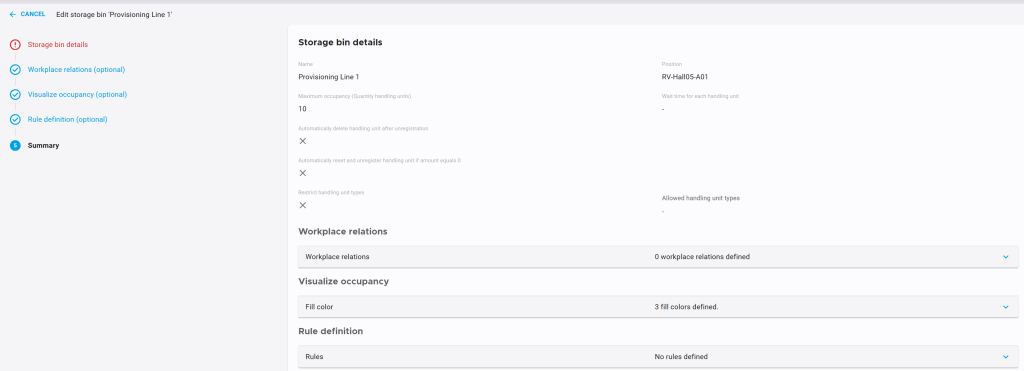
- Structuring storage hierarchies and buffer capacities:
In the storage bin management app, production areas, halls and buffer zones are modeled digitally. Physical capacity limits and permitted container types are defined for every storage and buffer location to rule out incorrect occupancy both physically and logically. - Standardized handling unit and master data management:
The handling unit configuration app manages all handling units used in the plant (e.g. SLCs, Euro pallets, mesh box pallets or special trolley types) in a standardized way, including dimensions, tare weight and capacities.
Visual inventory management and dynamic monitoring
3/6
Process
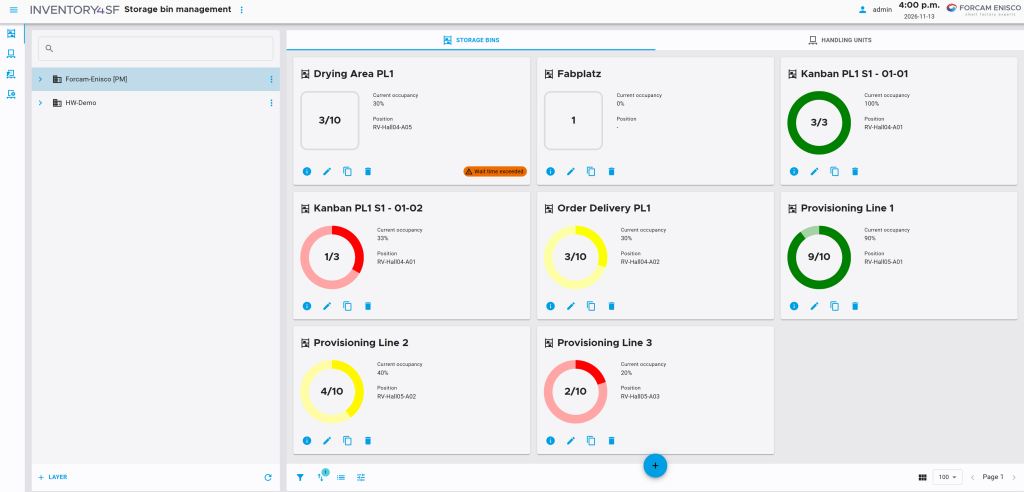
- In storage bin management, the occupancy status of the buffer is updated immediately.
- In the handling units overview, dispatchers and workers can filter and sort inventory by material, order or remaining dwell time.
Platform task
- Capturing material movements and states:
The HU registration area of the application enables error-free registration and deregistration of handling units at storage bins. This is done either manually and ergonomically with barcode/RFID handheld scanners or automatically via REST APIs and triggers from higher-level systems (such as MES FLEX, third-party systems or AC4DC events).
Dwell time control and proactive escalation
4/6
Process
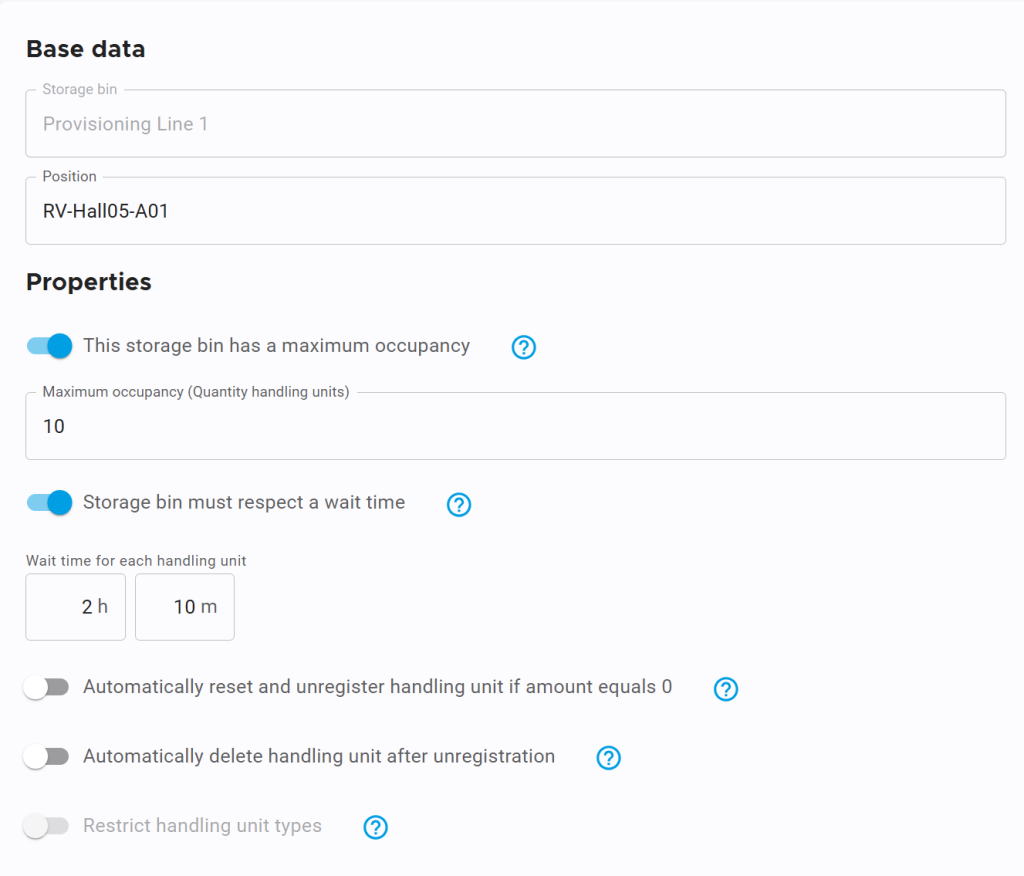
- While the handling unit remains in the buffer, the timer runs.
- If a container reaches the maximum buffer time or a buffer is about to overflow, the open interface to Solve4SF can trigger a ticket so that logistics staff remove the material with priority.
Platform task
- Managing quality and life cycle attributes:
In the handling units area of Inventory4SF, attributes such as release status (e.g. blocked, released), quality categories (good part, scrap, rework) as well as order and material references are maintained and visualized.
Deregistration and handover to the next operation
5/6
Process
- For further processing at the next work step, the handling unit is deregistered. The inventory reduction is reported synchronously to higher-level MES and ERP systems, which marks the buffer location as free again and completes the WIP step.
PLatform TAsk
- Real-time dwell time monitoring and alerting:
The system continuously monitors the dwell times of individual handling units at their buffer locations. If dwell times are about to be exceeded or fill levels are violated, automated notifications and instructions are escalated directly to the responsible staff via interfaces (such as Solve4SF).

Transparent shop floor material management with Inventory4SF creates considerable business and operational benefits
6/6
Added value
- Significantly less tied-up capital: Eliminating the lack of transparency in intermediate buffers makes it possible to reduce safety stocks and surplus quantities in a targeted way, which frees up working capital.
- Avoiding production stops and waiting times: A clear overview of material availability prevents material shortages at downstream workstations and ensures uninterrupted production.
- Guaranteed compliance with process and quality deadlines: Time-based dwell time monitoring protects against overstorage, aging or processing of workpieces that have not fully cured, ensuring that strict quality standards are met.
- High ergonomics and relief for workers: Intuitive, browser-based user interfaces and scanner support minimize manual entry errors and put an end to unproductive search times in the halls.
- Seamless integration: As containerized microservices with open REST interfaces, Inventory4SF and AC4DC fit flexibly into modern IT/OT ecosystems and bridge the gap between the decentralized shop floor and central planning.