
Data source: people
Connected Workforce
Bring workers directly into the data flow: carry out work steps with guidance and report disruptions at the workstation – digitally, without paper, without media breaks.
Start small. Scale fast.
Started fast. Scaled by your own teams.
Installation and first guided processes in less than a day. From the very first run, results are available digitally for analysis. From there, your teams scale on their own: new plans are built by reusing proven templates.
Start
< 1 day
installation and first processes
Start
From run #1
results available for analysis
Scale
Reuse
create new plans from existing ones
Scale
Self-organized
scaling driven by your own teams
The challenge
Knowledge at the workstation gets lost
Processes on paper, reports called out across the shop floor: what the worker sees and measures often reaches the systems too late or not at all.
Paper and Excel lists
Plans, instructions and records on paper are error-prone, hard to keep up to date and difficult to analyze.
Reports without trace or structure
Disruptions and needs are reported by phone or by calling out. Who is responsible and how long it takes remains unclear.
No basis for improvement
Without systematic digital recording, the data for audits, root cause analysis and continuous improvement is missing.
How it works
From the workstation straight into the data foundation
Central specifications enable data capture where the work happens.
01
Specify
Define centrally
Plans and report templates are created once centrally and automatically distributed to the workstations.
02
Capture
Document at the workstation
The worker is guided through the plan step by step or reports a disruption – at the terminal or in the browser.
03
Pass on
Process in real time
Results and reports are immediately available to quality assurance, the experts and the downstream systems.
Guided Processes
Guided processes at the workstation
Every step right, every step documented: the worker is guided step by step through a defined process – whether inspection, assembly or cleaning. This way, you ensure quality directly in the process and create a complete data foundation for audits according to ISO 9001 or IATF 16949.
Examples from practice
Quality inspection
First article, sampling or 100% inspection – also multi-stage across several workstations.
Assembly instructions
Assembly steps in the right order, with an instruction and document for each step.
Work instructions
Standardized processes at the workstation – carried out the same way in every shift.
Cleaning
Trigger cleaning plans by interval and document their execution completely.
How AC4DC supports you
Step-by-step wizards
Clear user guidance for the shop floor, with an instruction and document for every step.
Triggered automatically
Intervals based on quantity or time start the plan at the right workstation.
Centrally maintained plans
Changes go directly to the shop floor – no outdated printouts.
Unique identification
Workpieces and handling units are clearly assigned.
Limits in view
Deviations become visible right at input.
Production context
Order, workstation and further data from the manufacturing system are included.
Analyze results
Every plan becomes insight
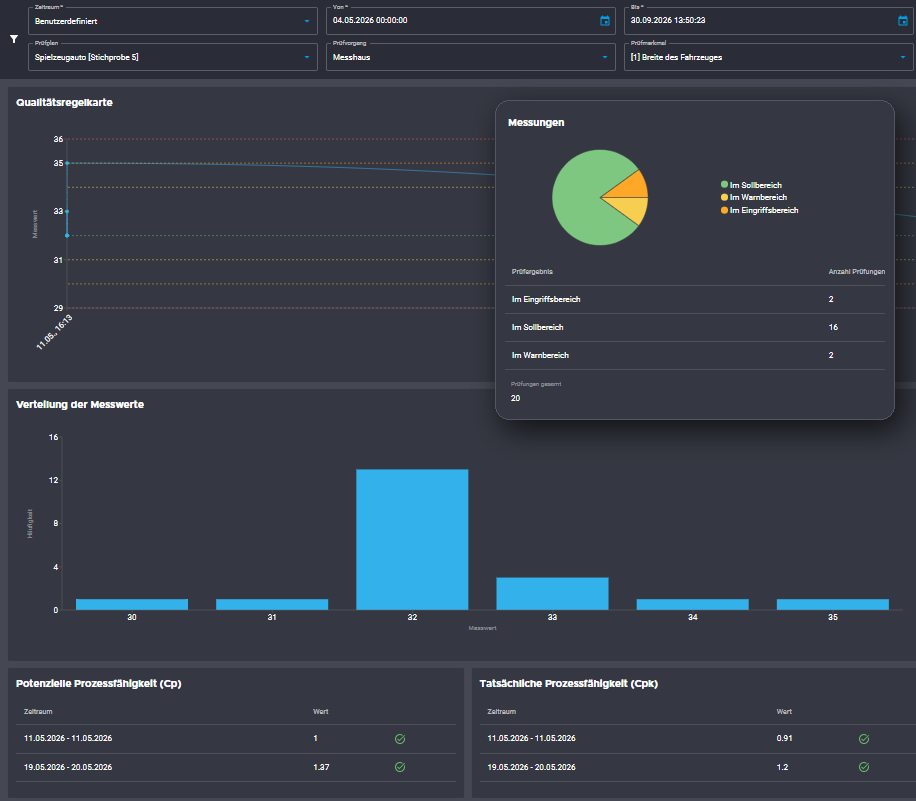
Every completed plan delivers data. The analysis shows the results in real time and makes deviations and trends visible – before they become a problem:
- Analyze the results of all plans in real time
- Process capability (Cp/Cpk), control chart and distribution of measured values
- Filter by plan, workstation and production data – export as CSV
Incident Reporting
Report disruptions and needs
Workers report disruptions, material needs and requests directly at the workstation. The report automatically reaches the responsible experts.
Disruptions
Material needs
Requests
Report without media breaks
Directly from the shop floor terminal, in the browser or via a link with a preselected report type.
Consistent reports
Templates ensure that the same information is always captured.
Automatic data transfer
Data from the shop floor terminal is transferred into the report.
Multilingual
Report types and fields in several languages – for international teams.
Seamlessly integrated
Where the worker works
Guided processes and reports run in the familiar working environment – without an additional system at the workstation.
Shop floor terminal in the MES
Call up plans and reports directly from the production process.
Browser
On PC or tablet, with a user interface designed for the shop floor.
REST API
Create reports automatically from third-party systems, integrate production data.
FAQ
Frequently asked questions
Which workflows can be mapped as guided processes?
Any workflow that an operator works through step by step – for example inspection plans, work plans, assembly plans and cleaning plans. You can define further plan types yourself. Each step can have its own fields, instructions and documents.
How is a plan started at the workstation?
Automatically or manually. Intervals based on quantity or time trigger the plan automatically for each workstation, and the operator is notified directly. Open tasks can also be started at any time from an overview – in the shop floor terminal or in the browser.
How much effort is it for operators to use?
Very little. Assistants guide operators through the plan step by step, with instructions and documents for each step. The interface is designed specifically for the shop floor and runs in the browser or directly in the shop floor terminal.
How do updated plans reach the workstation?
Plans are maintained centrally. Changes are available immediately at all assigned workstations – without printouts, outdated versions or redundant supplementary documents.
How do operators report malfunctions or material requirements?
Directly at the workstation: from the shop floor terminal, in the browser or via a link with a preselected report type. Templates ensure that the same information is always captured. Data from the shop floor terminal is transferred automatically.
Who is notified when an issue is reported?
Each report type is assigned to an expert group, which is notified automatically in the application or by email. If a report is not handled, defined escalation levels with time limits and additional recipients take effect.
Are reports available in multiple languages?
Yes. Report type names and the content of custom fields can be maintained in several languages – for international teams and plants.
Does AC4DC support audits according to ISO 9001 or IATF 16949?
Yes. Every step is documented digitally and completely – with result, time and reference to order and workstation. This provides a complete data basis for audits and compliance requirements. Certification itself remains the responsibility of your quality management.
Can this be integrated into our existing MES?
Yes. Plans and reports can be opened directly from the production workflow in the MES, for example from the shop floor terminal. Browser access and a REST API are available for the integration; data such as order or workstation can be adopted as production reference.
Guided work and reporting – digital from the first workstation
In a demo, we show you how your workers work with guidance and feed their results and reports directly into the shared data foundation.